How to Automate Prior Authorization: A Technical Guide to Electronic Prior Auth (ePA) Implementation
Automate prior auth with ePA. This technical guide covers HL7 FHIR, X12 278, Da Vinci IGs, and CMS-0057 compliance for 50% staff time reduction.
by
VitalCX Healthcare Operations Team
April 5, 2026
7 minutes
Share
Automate prior auth with ePA. This technical guide covers HL7 FHIR, X12 278, Da Vinci IGs, and CMS-0057 compliance for 50% staff time reduction.
Electronic prior authorization (ePA) reduces turnaround from 5–14 days (manual) to 1–2 days, with 60–75% time savings.
The technical stack is HL7 FHIR, X12 278 transactions, and Da Vinci Implementation Guides (PAS, CRD, DTR).
CMS-0057 requires payer-side API readiness by January 2026, with full compliance by January 2027.
AI layered on top of ePA automates documentation extraction and medical necessity determination, reducing staff time by 50%.
Electronic prior authorization (ePA) replaces manual prior authorization workflows — fax transmissions, phone calls, payer web portals, and manual documentation gathering — with standardized electronic transactions between provider and payer systems. Organizations that implement ePA reduce prior authorization turnaround times from 5–14 days to 1–2 days, cut staff time per request by 50%, and eliminate the documentation rework cycle that drives denials. This guide covers the technical standards, implementation steps, AI augmentation, and CMS-0057 compliance timeline for healthcare organizations planning ePA deployment.
What Is Electronic Prior Authorization (ePA)?
Electronic prior authorization is the use of standardized electronic data exchange to submit, process, and respond to prior authorization requests between providers and payers. Unlike payer-specific web portals — which require manual data entry into each payer's proprietary system — ePA uses industry standards that enable a single workflow across all payers.
The distinction matters because the "portal problem" is a major source of inefficiency. A typical health system contracts with 20–50 payers, each with its own prior auth portal, login credentials, form fields, and documentation requirements. Staff spend hours navigating different systems, re-entering the same clinical data, and tracking requests across multiple platforms.
ePA solves this by standardizing:
The request format (what data is submitted)
The exchange method (how data moves between systems)
The response format (how approvals, denials, and information requests are returned)
The documentation requirements (what clinical evidence is needed)
The result is a workflow that starts and ends in the provider's EHR or practice management system, without requiring staff to leave their primary workspace.
Manual vs. Electronic: Time and Cost Comparison
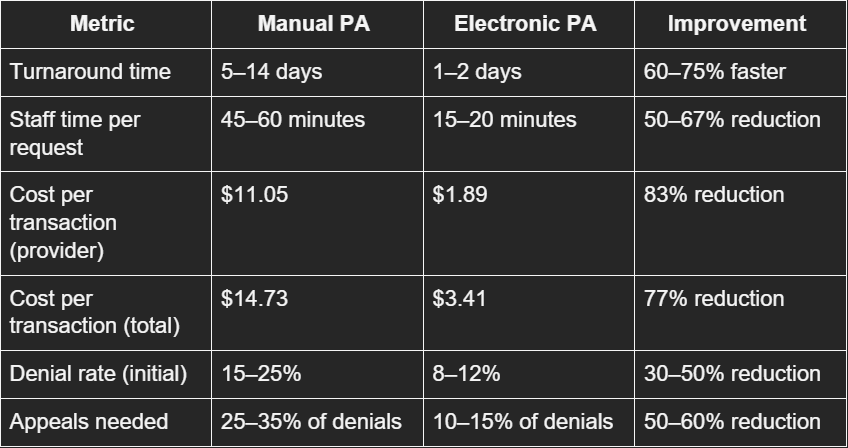
The operational difference between manual and electronic prior authorization is stark:
Source: CAQH Index Report 2024, AMA Prior Auth Survey 2024
The denial rate reduction is particularly significant. Manual submissions have higher denial rates because of incomplete documentation, transcription errors, and mismatched payer criteria. Electronic submissions using structured data and automated documentation templates address these root causes before the request is even submitted.
For a health system processing 50,000 prior authorization requests per year, the transition from manual to electronic represents:
$458,000 in direct transaction cost savings (provider-side)
25,000–33,000 staff hours recovered annually
2,500–6,500 fewer denials per year
Faster revenue capture from reduced authorization delays
The Tech Stack: HL7 FHIR, X12 278, Da Vinci IGs
Three interconnected standards form the technical foundation of electronic prior authorization:
X12 278 Health Care Services Review
The X12 278 is the HIPAA-mandated standard transaction for submitting and responding to prior authorization requests. It has been part of the HIPAA administrative simplification provisions since the original 1996 legislation.
The 278 transaction supports:
278 Request — provider submits a prior auth request
278 Response — payer returns a decision (approved, denied, pended, request for additional info)
278 Inquiry — provider checks the status of a pending request
Despite being mandated, X12 278 adoption has been slow because of:
Limited EHR integration (many EHRs don't natively support 278 transactions)
Payer-side implementation gaps
Inability to attach clinical documentation to the 278 transaction (the standard was designed for structured administrative data, not unstructured clinical notes)
FHIR is the modern API standard that CMS-0057 mandates for prior auth. Unlike X12's batch-oriented, EDI-based approach, FHIR uses RESTful APIs that enable:
Real-time interactions — submit a request and receive a response in seconds for auto-adjudicable cases
Rich data payloads — attach clinical documentation, images, and structured clinical data alongside administrative data
Modern developer experience — JSON/XML formats, OAuth2 authentication, standard HTTP methods
FHIR prior authorization uses several key resources:
Claim / ClaimResponse — for the authorization request and response
CoverageEligibilityRequest / CoverageEligibilityResponse — for eligibility checks
DocumentReference — for clinical documentation attachments
QuestionnaireResponse — for payer-required clinical questionnaires
Da Vinci Implementation Guides
The HL7 Da Vinci Project — a collaboration between payers, providers, and technology vendors — has developed three Implementation Guides (IGs) that operationalize FHIR for prior authorization:
1. Coverage Requirements Discovery (CRD)
Runs at the point of order entry in the EHR
Checks whether the ordered service requires prior auth for the patient's specific payer and plan
Returns documentation requirements if prior auth is needed
Uses CDS Hooks to integrate into the clinician's ordering workflow
2. Documentation Templates and Rules (DTR)
Launches when CRD indicates prior auth is required
Presents payer-specific clinical questionnaires
Auto-populates answers from EHR data using CQL (Clinical Quality Language) expressions
Clinician reviews and completes any remaining fields
Dramatically reduces manual documentation time
3. Prior Authorization Support (PAS)
Submits the completed prior auth request via FHIR API
Bundles administrative data (X12 278 content) with clinical documentation
Returns real-time responses for auto-adjudicable requests
Returns pended status with tracking information for requests requiring manual review
Supports status inquiries and updates
The integrated workflow:
Clinician orders a service in the EHR
CRD fires → checks if prior auth is needed → returns requirements
DTR launches → presents questionnaire → auto-populates from chart data → clinician completes gaps
PAS submits → sends request with documentation to payer API → receives response
Authorization result is written back to the EHR order
This workflow reduces a multi-day, multi-system process to minutes within the clinician's existing EHR workspace.
Step-by-Step: Implementing ePA
Step 1: Assess Current State
Inventory current prior auth volume by payer, service type, and department
Document current workflows (who submits, through which channels, time per request)
Identify top payers by prior auth volume (focus implementation on highest-volume payers first)
Evaluate EHR capabilities — does your EHR support Da Vinci IGs natively or through a third-party module?
Step 2: Select Technology Approach
Three approaches, depending on organizational size and resources:
EHR-native. Epic, Oracle Health (Cerner), and MEDITECH have built or are building Da Vinci IG support. If your EHR vendor offers native CRD/DTR/PAS, this is the lowest-friction path.
Middleware/integration platform. Companies like Availity, Surescripts, Moxe Health, and Rhyme offer ePA middleware that connects your EHR to payer APIs. Useful when your EHR's native capabilities are limited or when you need to connect to payers not yet supporting FHIR.
Third-party ePA platform. Standalone platforms (e.g., Infinitus, Cohere Health, Olive AI successor products) that handle the complete prior auth workflow, often with AI-augmented features. Best for organizations with high prior auth volumes and limited IT resources.
Step 3: Payer Connectivity
Identify which of your top payers have FHIR-based prior auth APIs available (CMS-0057 mandates this for regulated payers by January 2026)
Register with payer developer programs and obtain API credentials
Test connectivity in payer sandbox environments
Establish production connections with volume testing
Step 4: EHR Integration
Configure CDS Hooks for CRD integration at order entry
Implement SMART on FHIR app for DTR questionnaire rendering
Map EHR data elements to CQL expressions for auto-population
Configure PAS submission and response handling
Build status tracking and notification workflows
Step 5: Workflow Redesign
Train clinical staff on the new in-EHR prior auth workflow
Redesign authorization team roles (shift from submission/follow-up to exception management)
Establish escalation paths for pended requests and denials
Define metrics: turnaround time, auto-approval rate, denial rate, staff time per request
Step 6: Go-Live and Optimization
Pilot with one department and one to two high-volume payers
Monitor auto-adjudication rates and identify requests that consistently pend
Refine DTR questionnaire mappings to increase auto-population rates
Expand to additional payers and departments in 90-day waves
Target: 60–70% of requests processed through ePA within 12 months
How AI Layers on Top of ePA
Electronic standards create the pipes. AI creates the intelligence within those pipes.
Pre-submission AI:
Reads the patient chart and automatically extracts clinical evidence relevant to the authorization request
Compares documentation against payer-specific medical necessity criteria
Identifies documentation gaps before submission and alerts the clinician
Predicts approval likelihood based on historical data
Submission AI:
Auto-completes DTR questionnaires by interpreting unstructured clinical notes (not just structured EHR fields)
Selects the strongest clinical evidence to include with the submission
Routes routine, high-confidence requests for auto-submission without staff review
Post-submission AI:
Monitors pended requests and predicts when additional documentation will be requested
Auto-generates appeal packages when denials occur, pulling clinical evidence and relevant literature
Tracks authorization expirations and triggers renewal workflows
The combination of ePA infrastructure and AI augmentation is where 50% staff time reduction and 60–75% turnaround gains come together. ePA alone enables electronic submission. ePA with AI enables fully automated submission.
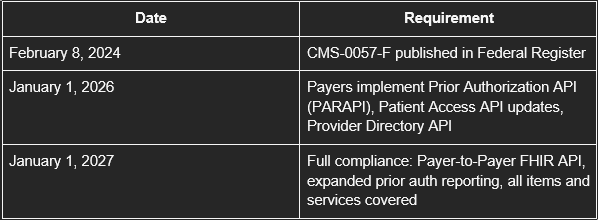
CMS-0057 Compliance Timeline
What this means for providers:
By January 2026, your top CMS-regulated payers should have FHIR-based prior auth APIs available
Provider-side ePA implementation can begin as soon as payer APIs are live
Organizations that invest in ePA infrastructure in 2025–2026 will have a 12–18 month head start on operational savings
Those that wait until 2027 will be retrofitting while competitors are optimizing
What this means for payers:
API development and testing must be complete by late 2025
Specific denial reason reporting requires clinical decision documentation
Payer-to-Payer API requires data sharing infrastructure with competitor plans
The VitalCX Healthcare Operations Team brings decades of combined experience in revenue cycle management, patient access, and healthcare technology to help health systems operate at their best.
FAQ's
What is ePA and how is it different from using a payer portal?
Electronic prior authorization (ePA) uses standardized electronic transactions (HL7 FHIR, X12 278, Da Vinci IGs) to submit and process prior auth requests directly from the provider's EHR. Payer portals require manual data entry into each payer's proprietary system. ePA is one workflow for all payers; portals are a different workflow for each payer.
How long does ePA implementation take?
A typical implementation takes 6–12 months from assessment to go-live with the first payer cohort. Full deployment across all major payers usually takes 18–24 months. Organizations with EHR vendors offering native Da Vinci IG support can move faster.
What is the CMS-0057 deadline for electronic prior authorization?
CMS-0057-F requires CMS-regulated payers to implement FHIR-based prior authorization APIs by January 1, 2026, with full compliance (including Payer-to-Payer API and expanded reporting) by January 1, 2027. The rule applies to Medicare Advantage, Medicaid managed care, CHIP, and ACA marketplace plans.
Can ePA work with all payers, including commercial plans?
CMS-0057 mandates API availability for CMS-regulated payers. Commercial group plans are not directly regulated but many are expected to adopt the same FHIR standards voluntarily. In the interim, middleware platforms can bridge the gap by supporting both FHIR-based and legacy (X12, portal) submission methods.
What ROI can we expect from ePA implementation?
Organizations report 50% staff time reduction, 60–75% turnaround improvement, 77% cost reduction per transaction, and 30–50% fewer initial denials. For a system processing 50,000 prior auth requests annually, this translates to $450K+ in direct savings and 25,000+ staff hours recovered per year.
Tell us where complexity shows up in your patient journey, and we'll show you how VitalCX can help drive compliance, coordination and care across your organization.
Thank you! Your submission has been received!
Oops! Something went wrong while submitting the form.